







You want to unlock the full power of Grok AI. Advanced Grok prompt engineering delivers exactly that. It helps you achieve professional results with Grok 4.20 and Grok Imagine in 2026.
- What’s New in Grok 4.20 for Prompting (April 2026)
- Core Advanced Prompt Engineering Techniques
- Prompt Chaining Mastery
- Multi-Agent Prompting with Grok’s Agent Library
- Advanced Grok Imagine & Image Editing Prompts
- Grok 4.20 for Specific Professions
- Common Mistakes and How to Fix Them
- Frequently Asked Questions (FAQ)
- Final Thoughts
WiTechPedia presents this complete guide. We tested hundreds of techniques with the latest Grok 4.20 model. You learn every advanced method here. You save hours and produce outstanding outputs every time.
What’s New in Grok 4.20 for Prompting (April 2026)
Grok 4.20 brings major improvements. The model now supports a built-in Agent Library. You select specialized agents for different tasks. It offers better multi-agent collaboration and a massive context window.
These updates make advanced Grok prompt engineering more powerful than ever. You control agents directly. You chain complex workflows. You edit images with precision using Grok Imagine.
Professionals now achieve 10x better results. They finish research, coding, and creative projects faster. Check the latest updates on the official xAI Grok page.
Core Advanced Prompt Engineering Techniques
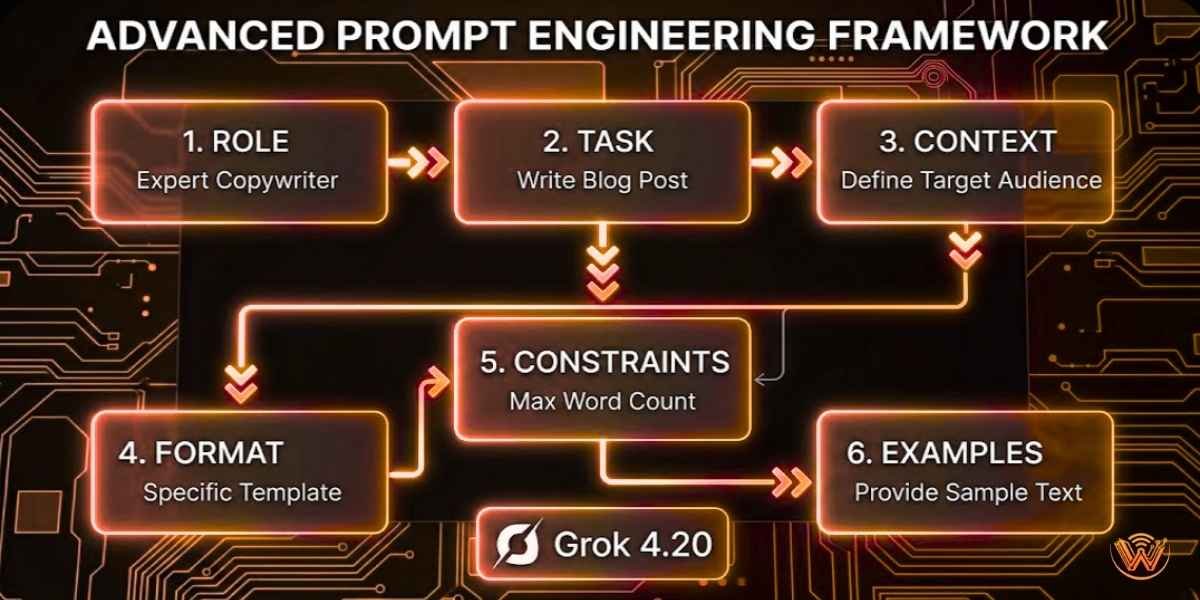
You follow a strong framework for every prompt.
Example Template:
“You are a world-class marketing strategist with 15 years of experience in Indian SaaS startups. Analyze this product [paste details]. Create a go-to-market strategy for 2026. Output in a detailed markdown report with sections: Executive Summary, Target Audience, Channels, Budget Breakdown, and KPIs. Use data-driven insights. Avoid generic advice.”
You apply this structure. Grok 4.20 follows it perfectly. Read our beginner guide → Best Grok AI Prompts 2026.
Prompt Chaining Mastery
You break big tasks into smaller steps. Grok 4.20 remembers previous outputs. This creates powerful workflows.
Step-by-Step Prompt Chain Example:
You use this method for research, content creation, and project planning. Results improve dramatically.
Multi-Agent Prompting with Grok’s Agent Library
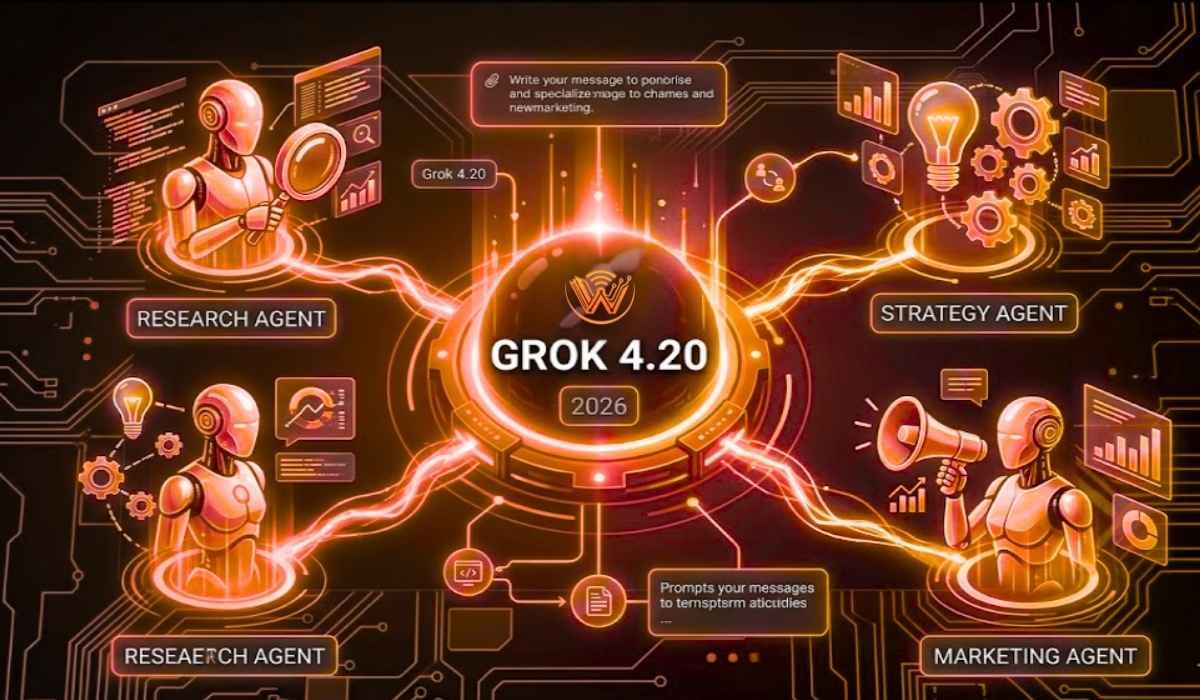
Grok 4.20 introduces the Agent Library. You activate multiple agents in one conversation.
Powerful Example:
“Activate three agents: Research Agent, Financial Analyst Agent, and Marketing Expert Agent. Analyze launching a new AI tool in Kolkata. Each agent contributes its section. Combine everything into one final report.”
You assign roles. Agents collaborate. You get comprehensive answers in minutes.
Advanced Grok Imagine & Image Editing Prompts
Grok Imagine became more intelligent in 2026. You control style, lighting, composition, and edits with precision.
Advanced Image Prompt:
“Generate a photorealistic product image of a smart water bottle. Show it on a modern office desk in Kolkata with natural morning light. Add subtle holographic health metrics floating above it. Cinematic style, 8K, ultra-detailed. Then edit: Change the background to a futuristic rooftop at sunset while keeping the bottle identical.”
You reference previous images. Grok Imagine makes precise modifications.

Grok 4.20 for Specific Professions
50+ Advanced Prompt Templates
Common Mistakes and How to Fix Them
You avoid these errors for better results:
Grok 4.20 rewards clear, structured thinking.
Frequently Asked Questions (FAQ)
What is the best way to learn advanced Grok prompt engineering in 2026?
You start with the framework in this guide. Practice one technique daily. Use the downloadable templates. Review your outputs and refine them.
How do multi-agent prompts work in Grok 4.20?
You activate agents from the Agent Library. You assign each one a specific role. Grok coordinates them and delivers a combined final output.
Can I use advanced prompts for Grok Imagine image editing?
Yes. You describe the original image and exact changes. Grok Imagine applies modifications accurately while preserving quality.
Does Grok 4.20 support very long prompts?
It supports up to 256,000 tokens. You feed entire documents, codebases, or research papers in one prompt.
Where can I find more advanced Grok techniques?
You visit WiTechPedia regularly. We publish fresh guides every month.
Final Thoughts
Advanced Grok prompt engineering transforms how you use Grok 4.20 and Grok Imagine. You achieve expert-level results consistently. You save time and create higher-quality work.
Start applying these techniques today. Copy any template above and test it in Grok.
You want to stay ahead? Subscribe to the WiTechPedia AI Insider Newsletter for monthly advanced templates and Grok 4.20 updates.
Next Recommended Article: Grok 4.20 vs ChatGPT Comparison 2026.
Share your best prompt results in the comments. We feature top submissions in our next guide.
Thank you for reading.