







Every time you start a new Claude conversation, you start from zero.
- What Are Claude Skills?
- The Two Types of Claude Skills You Need to Know
- How Claude Skills Work: The Architecture
- Anthropic’s Official Built-In Claude Skills
- The 9 Categories of Claude Code Skills
- How to Install Claude Skills
- How to Build a Claude Skill From Scratch
- Claude Skills vs MCP Servers: When to Use Each
- The Agent Skills Open Standard
- Best Claude Skills to Install in 2026
- Claude AI Skills 2026: Real-World Use Cases
- Frequently Asked Questions
- Conclusion: Skills Are How Serious Teams Use Claude
Your preferred output format, your team’s tone, your domain vocabulary — gone. You spend the first five messages re-establishing context you already established the last time. And the time before that. For a one-off question, that’s fine. For a professional team running repeatable AI workflows, it’s a tax on every single session.
Claude Skills are the fix.
Since Anthropic officially launched Skills in October 2025, they’ve become the dominant way to give Claude domain-specific capabilities without reprompting from scratch. The official skills repository on GitHub crossed 135,000 stars and 16,000 forks by mid-2026 — one of the fastest-growing AI tooling repositories ever recorded. Companies are moving from casual chat experiments to permanent, structured AI infrastructure. And Skills are what’s making that shift possible.
This guide covers everything: what Claude Skills are, how the architecture works, the two types of skills you need to know, how to install them, how to build your own, and which ones are worth installing right now.
What Are Claude Skills?
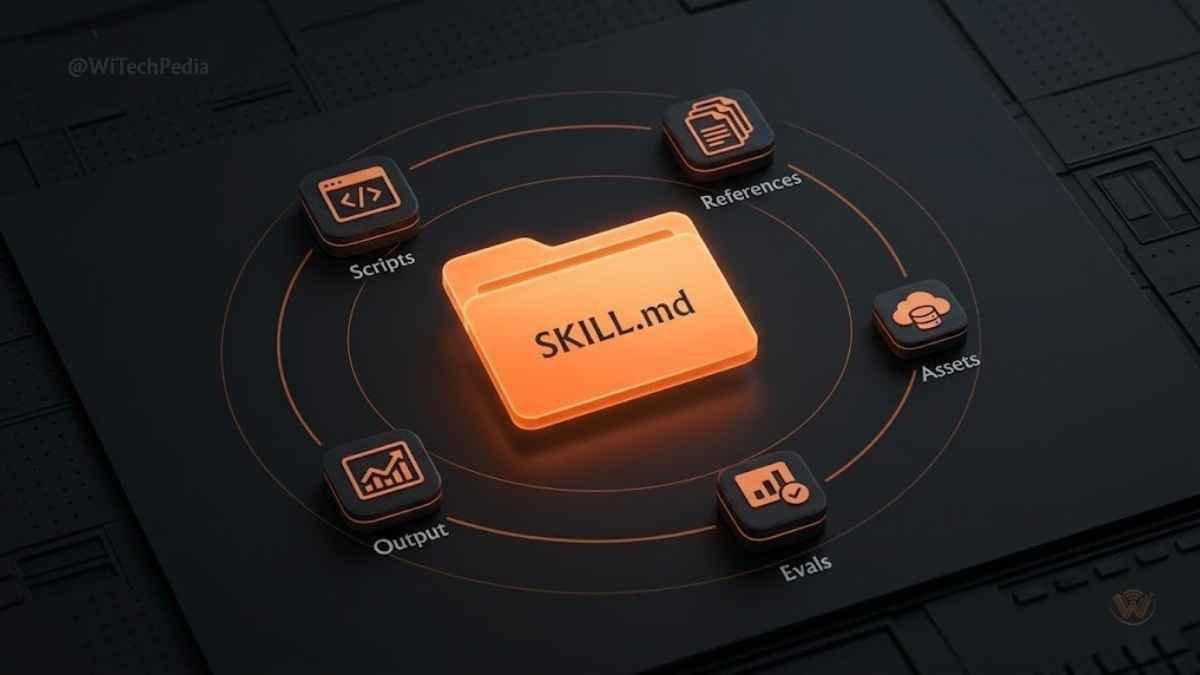
A Claude Skill is a reusable instruction package — a structured folder containing a SKILL.md file (plain-English directions for Claude), optional executable scripts, reference documentation, and supporting assets.
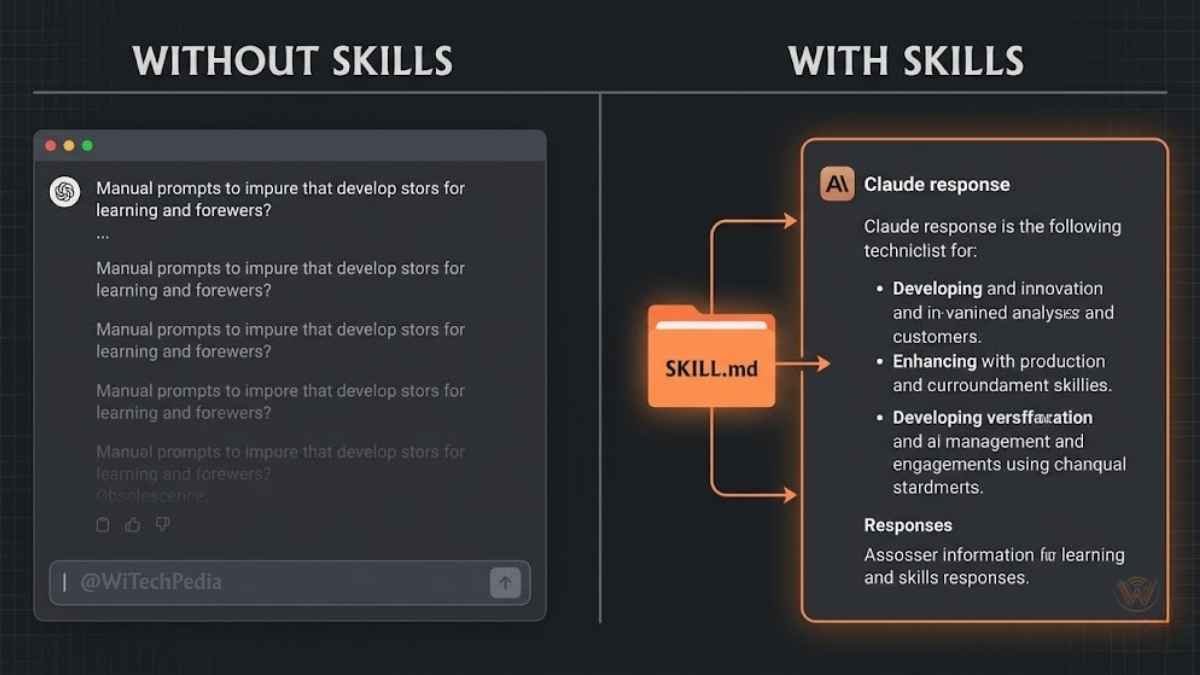
When Claude loads a skill, it gains persistent, task-specific context without needing to be re-trained or re-prompted. The instructions live outside the conversation — in the skill folder — and Claude loads them automatically when the task calls for it.
Think of it this way: instead of teaching Claude how your company writes every single session, you write the instructions once, save them as a skill, and Claude follows them automatically forever.
Key insight: Skills don’t change Claude’s underlying model. They encode your workflow, your preferences, and your domain expertise into reusable, versioned modules.
Skills work across Claude.ai, Claude Code, and the Claude API. Anthropic launched the feature as a preview for Pro, Max, Team, and Enterprise users on October 16, 2025, and published the open-source official skills repository at github.com/anthropics/skills the same week.
The Two Types of Claude Skills You Need to Know
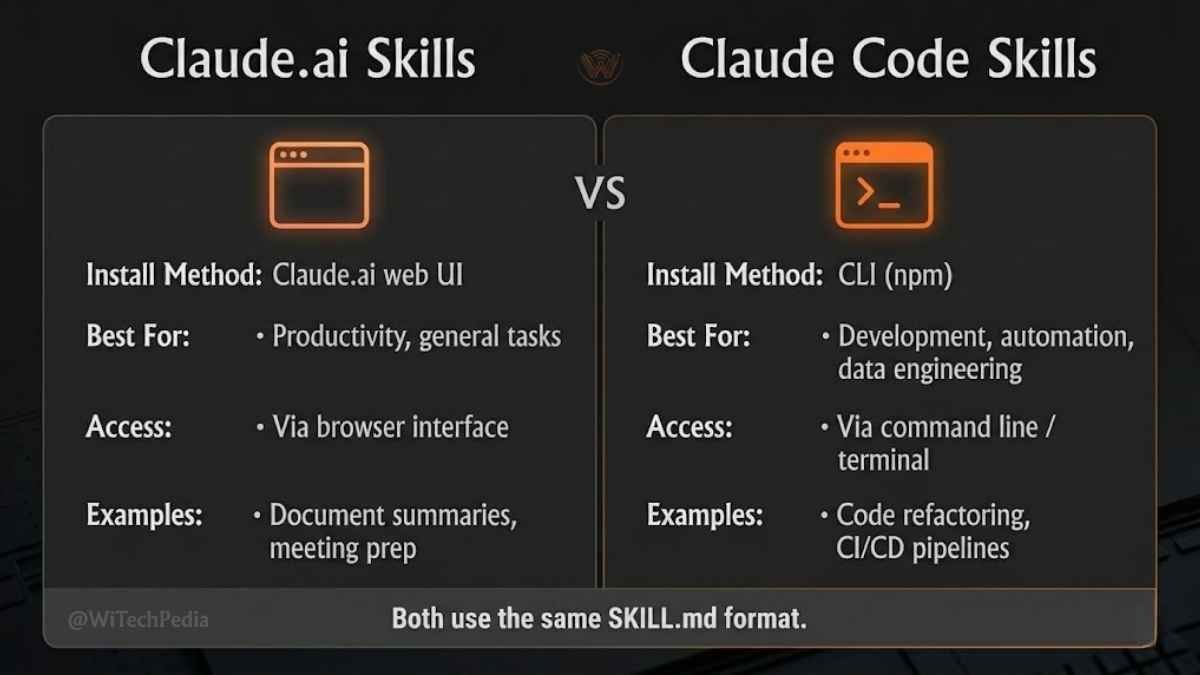
This is the distinction most guides miss — and it’s critical. There are two completely separate skill systems under the Claude umbrella:
| Feature | Claude.ai Skills | Claude Code Skills |
|---|---|---|
| Where they run | Claude.ai web/mobile app | Claude Code terminal agent |
| How to install | Upload ZIP via Settings > Customize > Skills | Place folder in ~/.claude/skills/ or .claude/skills/ |
| Who manages them | Anthropic + you (individuals or orgs) | You (personal or repo-scoped) |
| Built-in options | Excel, Word, PowerPoint, PDF, more | None pre-installed; community ecosystem |
| Best for | Business users, document workflows | Developers, coding automation |
| Open standard | Yes (Agent Skills open standard, Dec 2025) | Yes |
Both systems use the same SKILL.md file format. A skill built for Claude Code can be made compatible with Claude.ai and vice versa, following the Agent Skills open standard published at agentskills.io in December 2025.
How Claude Skills Work: The Architecture
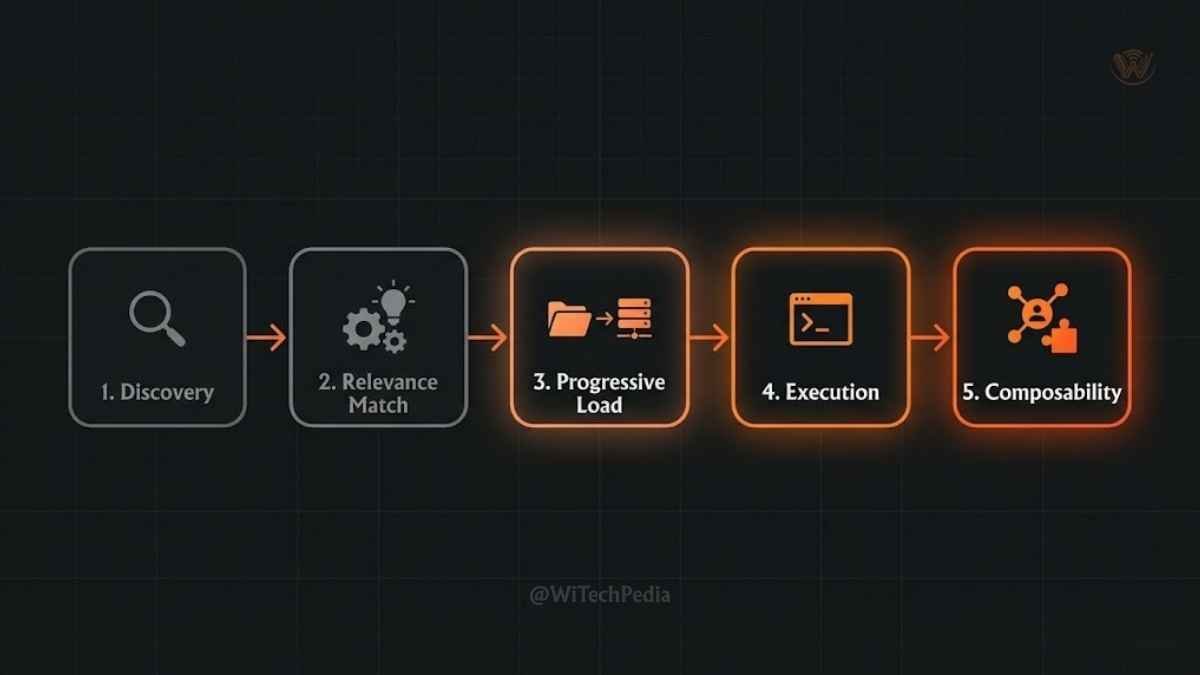
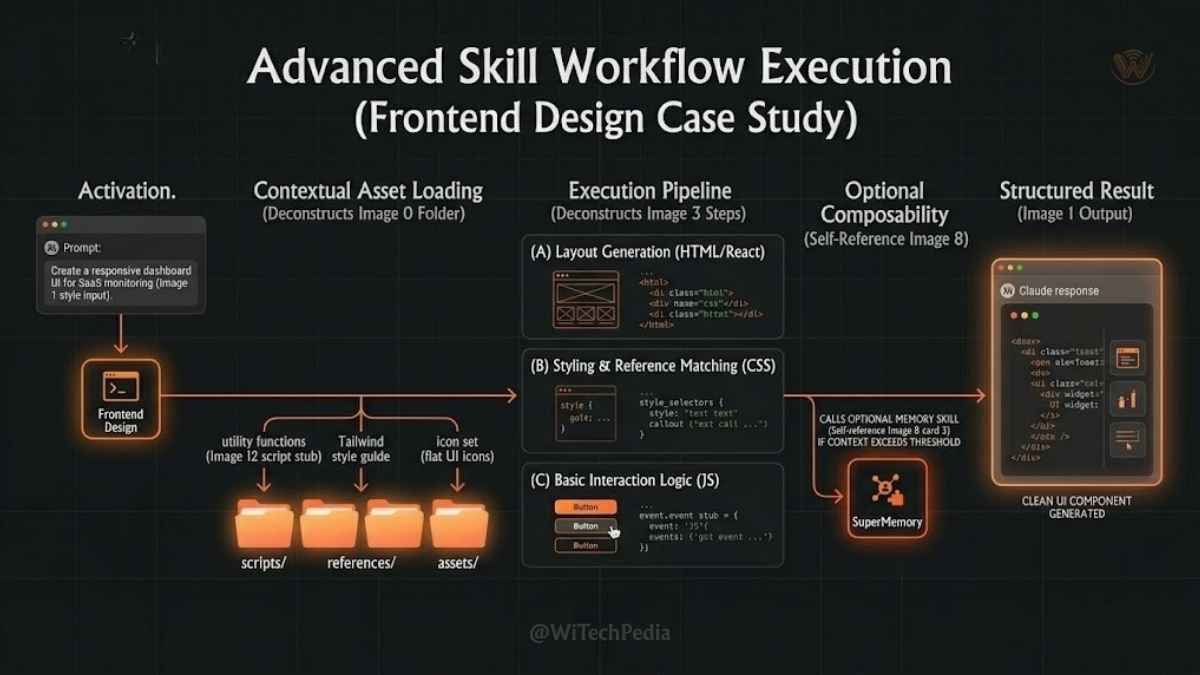
Claude’s skill system is built for efficiency. Here’s what happens under the hood when Claude encounters your skills:
- Discovery: Claude scans available skills at startup, reading only minimal metadata from each
SKILL.md— not the full file. - Relevance matching: Based on your request, Claude determines which skills are relevant to the active task.
- Progressive loading: Claude loads the full skill content — including referenced scripts or docs — only for relevant skills. Irrelevant skills stay dormant and don’t consume context.
- Execution: Claude applies the skill’s instructions, using any supporting scripts or resources as needed.
- Composability: Multiple skills can be active simultaneously. Claude coordinates them automatically.
This progressive disclosure architecture means you can have dozens of skills installed without bloating your context window on every session.
The SKILL.md File Structure
Every skill starts with a SKILL.md file. This is a Markdown document with a YAML frontmatter header followed by plain-English instructions:
my-skill/
├── SKILL.md          # Required: instructions + frontmatter
├── references/       # Optional: docs Claude loads on demand
├── scripts/          # Optional: executable helper scripts
├── assets/           # Optional: templates and resources
└── evals/            # Recommended: evaluation tests
    └── evals.json
The SKILL.md frontmatter requires only two fields:
yaml
---
name: my-skill-name
description: "What this skill does and when Claude should use it."
---
The description field is critical — Claude uses it during the relevance-matching step to decide whether to load your skill for a given task. A vague description means the skill gets ignored. A precise description means Claude loads it exactly when you need it.
Anthropic’s Official Built-In Claude Skills
Anthropic ships several official skills baked into Claude.ai for all paid users. As of 2026, these include:
You May Also Like
- Enhanced Excel — Advanced spreadsheet creation, formulas, pivot tables, and data modeling
- Word Document (DOCX) — Professional document generation with proper styles, headings, and tables
- PowerPoint (PPTX) — Full slide deck creation with layouts, imagery, and speaker notes
- PDF — PDF creation, form filling, merging, splitting, and text extraction
- Frontend Design — Production-grade UI components with distinctive visual aesthetics
Anthropic has open-sourced 17 official Agent Skills on GitHub covering creative design, document creation, technical development, and enterprise communication.
How to use built-in skills: Navigate to Customize > Skills in Claude.ai and toggle any skill on or off. With Code Execution enabled, Claude activates relevant skills automatically — you never need to invoke them explicitly.
The 9 Categories of Claude Code Skills
For developers using Claude Code, the community has organized skills into nine distinct categories. Each maps to a different type of workflow automation:
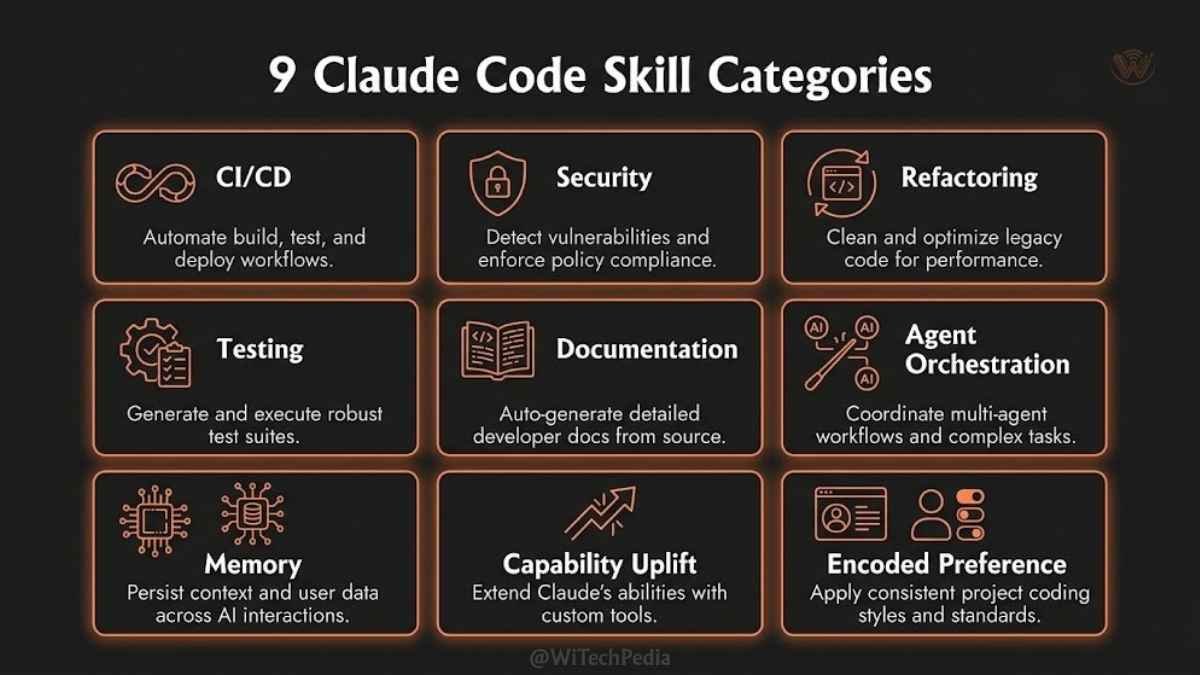
1. Encoded Preference Skills
The most underrated category. These skills encode your exact output format, writing voice, or structural requirements — turning generic Claude output into output that matches your team’s standards precisely.
Real-world use: A content team encodes their editorial style, headline format, and SEO structure into a single skill. Every article Claude drafts automatically hits their internal standards without a custom prompt.
2. CI/CD & DevOps Skills
Automate deployment pipelines, code review workflows, and release management. Skills in this category encode your team’s branching strategy, merge standards, and deployment gates.
3. Security & Code Review Skills
Embed security checklists, OWASP guidelines, and your organization’s specific vulnerability patterns into Claude’s review process. Claude flags issues against your actual standards, not generic best practices.
4. Refactoring Skills
Encode architectural patterns, naming conventions, and code style rules. Claude refactors code to match your codebase’s exact patterns — not a generic “clean code” template.
5. Testing & QA Skills
The Playwright + Superpowers skill combination is particularly popular — automated code testing paired with quality assurance review to catch issues before deployment.
6. Documentation Skills
Transform code, APIs, or processes into documentation that follows your team’s exact template and terminology.
7. Agent Orchestration Skills
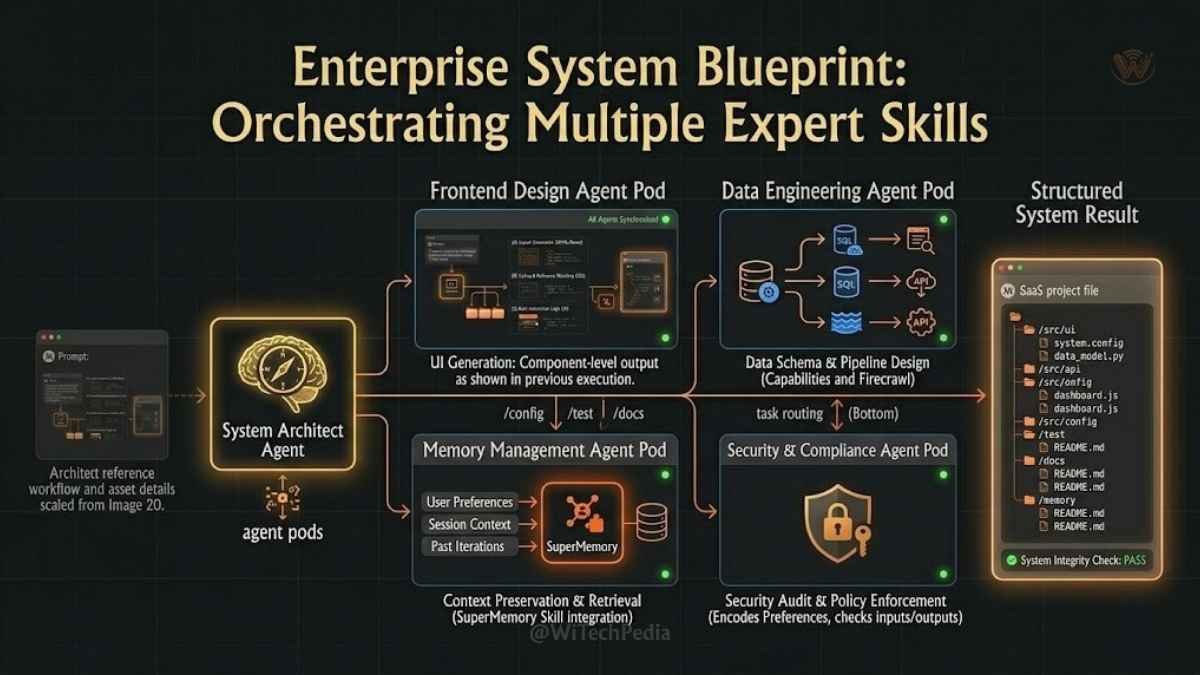
The Septum Agents Pack introduces 10 specialized sub-agents — planning, legal, marketing, and more — that Claude coordinates as a team rather than a single assistant.
8. Memory & Context Skills
Skills like SuperMemory give Claude persistent memory that survives across sessions, building cumulative knowledge about your codebase, preferences, and past decisions.
9. Capability Uplift Skills
Add entirely new capabilities Claude can’t perform reliably without structured guidance. Web scraping at scale (via Firecrawl), video generation code, and accessibility auditing all fall into this category.
How to Install Claude Skills
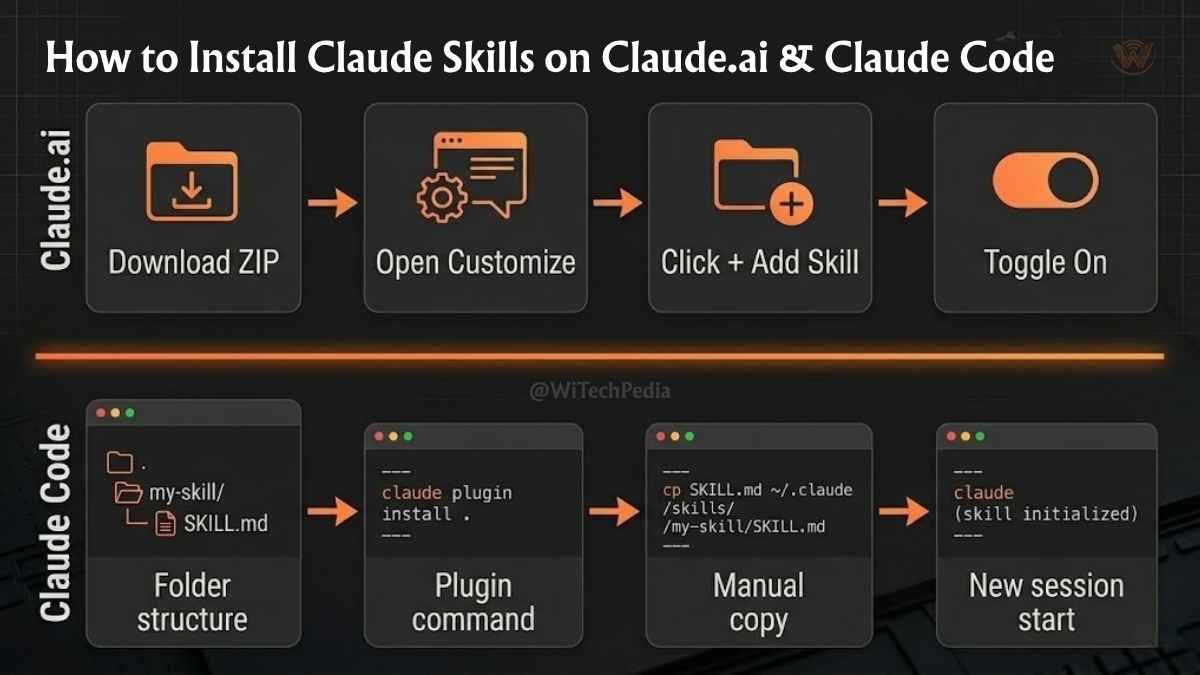
Installing Skills in Claude.ai
- Download the skill folder (or build your own).
- Package it as a
.zipfile. - In Claude.ai, navigate to Customize > Skills.
- Click the + button, then + Create skill.
- Upload your ZIP file.
- Toggle the skill on. Claude will use it automatically when relevant.
For Team and Enterprise accounts: Organization owners can deploy skills workspace-wide through organization settings. Users can also share individual skills with colleagues if the owner has enabled sharing.
Installing Skills in Claude Code
Claude Code uses a file-system approach. Skills live in one of two locations:
- Personal skills (all projects):
~/.claude/skills/your-skill-name/ - Project-scoped skills (shared via git):
.claude/skills/your-skill-name/
Option 1 — Plugin command (recommended):
bash
# Add the official Anthropic marketplace
/plugin marketplace add anthropics/skills

# Install a specific skill
/plugin install document-skills@anthropic-agent-skills
Option 2 — Manual install:
bash
# Clone or download the skill, then move it
cp -r my-skill/ ~/.claude/skills/

# Or unzip a downloaded skill
unzip my-skill.zip -d ~/.claude/skills/
Start a new Claude Code session after installing. Claude will acknowledge the skill on load and apply its instructions automatically.
How to Build a Claude Skill From Scratch
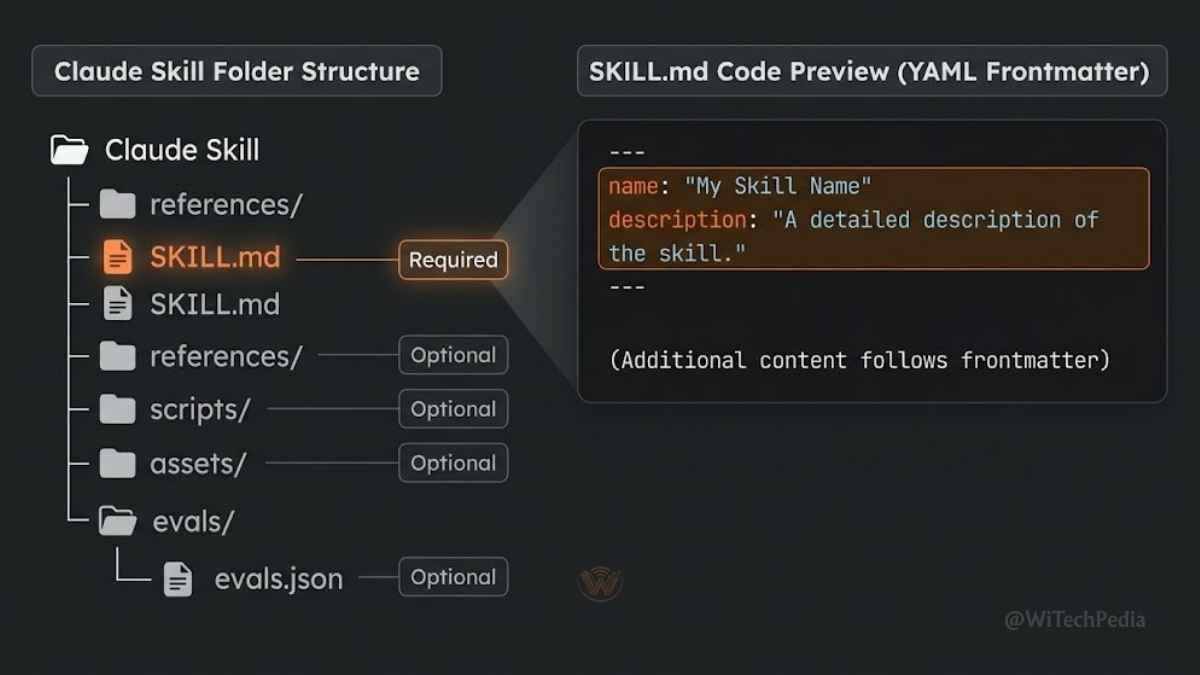
Building your own skill is simpler than most developers expect. Here’s the process:
Step 1: Identify the workflow
Pick one repeatable workflow that currently requires you to paste the same instructions into Claude repeatedly. The best skills start as solutions to a specific, annoying repetition.
Step 2: Create the folder structure
my-workflow/
└── SKILL.md
That’s the minimum. Add references/, scripts/, and assets/ only if the skill needs them.
Step 3: Write the SKILL.md
markdown
---
name: my-workflow
description: "Handles [specific task] for [specific context]. Activate when the user asks to [trigger description]."
---

# My Workflow Skill

## When to Use This Skill
Activate when the user needs to [specific trigger]. Do not activate for [exclusions].

## Instructions

1. [Step one]
2. [Step two]
3. [Step three]

## Output Format

[Describe exact output structure, tone, or format required]

## Quality Standards

[Describe what makes output good vs. bad for this workflow]
Step 4: Test before distributing
Create an evals/evals.json file with test cases that verify the skill produces the right output for known inputs. Anthropic recommends at least three positive test cases and two negative cases per skill.
Step 5: Distribute
- Personal use: Drop the folder into
~/.claude/skills/ - Team use: Commit to your repo under
.claude/skills/ - Organization-wide: Upload via Claude.ai organization settings
Claude Skills vs MCP Servers: When to Use Each
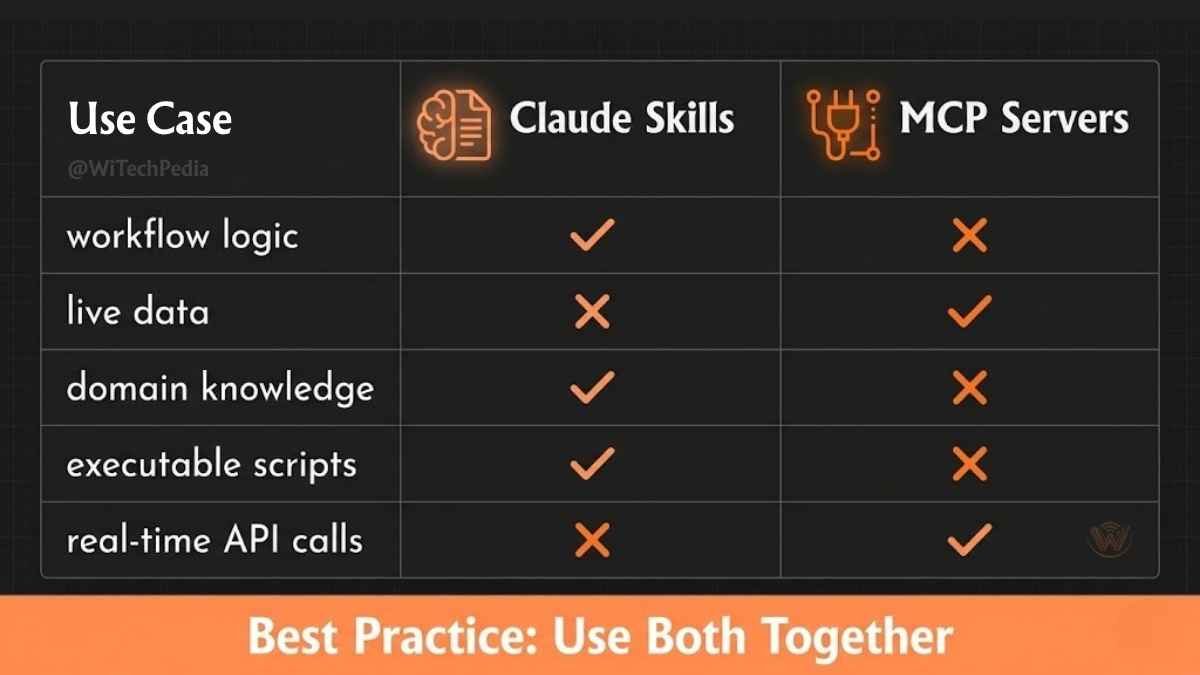
This is one of the most common questions from teams adopting Claude Skills. Here’s the clear answer:
| Use Case | Claude Skills | MCP Servers |
|---|---|---|
| Encode workflow logic and preferences | ✅ Best choice | ❌ Wrong tool |
| Connect to live external data | ❌ Wrong tool | ✅ Best choice |
| Package domain knowledge | ✅ Best choice | ❌ Wrong tool |
| Run executable scripts | ✅ Supported | ✅ Supported |
| Real-time API calls | ❌ Not designed for this | ✅ Best choice |
| Portable across AI platforms | ✅ Open standard | ✅ Varies |
The mental model: Skills encode how Claude should think and work. MCP connects Claude to tools and data sources. They’re complementary, not competing. Many teams use both — a skill defines the workflow, and MCP provides the live data that workflow needs.
The Agent Skills Open Standard
On December 18, 2025, Anthropic made Claude Skills significantly more interesting by publishing Agent Skills as an open standard at agentskills.io.
The spec is designed for portability. A skill built for Claude should, in principle, run in ChatGPT, Cursor, or any other platform that adopts the standard. Anthropic positions this alongside MCP as infrastructure that benefits the entire AI ecosystem — not just Claude users.
By mid-2026, the standard is gaining adoption across developer tools. Claude Code-specific features like context: fork, hooks, and allowed-tools are safely ignored by agents that don’t support them, preserving backward compatibility.
Best Claude Skills to Install in 2026
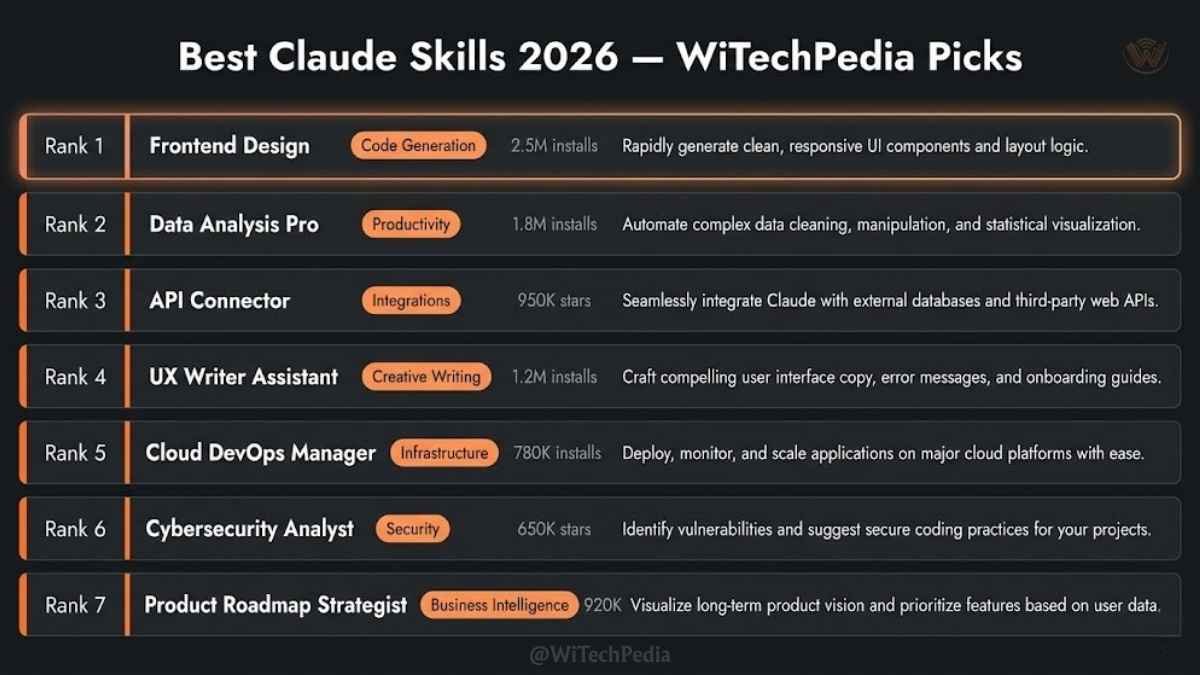
Based on community adoption and real workflow impact:
| Skill | Category | Why It’s Worth It |
|---|---|---|
| Frontend Design | Capability Uplift | 277K+ installs; prevents generic “AI slop” UI output |
| Karpathy Behavioural | Encoded Preference | Prevents silent wrong assumptions and over-engineering |
| SuperMemory | Memory | Persistent cross-session memory for your codebase |
| Firecrawl | Capability Uplift | Reliable web scraping at scale — Claude can’t do this without it |
| Playwright + Superpowers | Testing | Automated testing + QA review before deployment |
| Document Skills | Document Workflows | PDFs, decks, and Word docs as the primary output |
| Septum Agents Pack | Agent Orchestration | 10 specialized sub-agents for complex multi-role tasks |
Practical advice: Don’t install skills you don’t need. Extra skills don’t break anything, but they add unnecessary weight to the matching step. Start with bundled skills, add one official skill when it closes a real workflow gap, then build a custom skill when the same team workflow keeps repeating.
Claude AI Skills 2026: Real-World Use Cases
Enterprise Content Teams
A media company encodes their editorial style, SEO structure, and headline formula into an Encoded Preference skill. Every article draft Claude produces automatically matches their internal standards. Editors stop correcting format issues and focus on substance.
Software Development Teams
A dev team commits a project-scoped skill to their repository under .claude/skills/. The skill encodes their architecture patterns, naming conventions, and PR review checklist. Every developer who clones the repo gets Claude automatically working to the team’s standards — no onboarding required.
Legal and Compliance Teams
An enterprise team builds a compliance skill that embeds their contract review checklist and red-flag terminology. Claude applies it to every document review automatically, catching issues against their actual standards rather than generic legal best practices.
Solo Developers
An indie developer installs the Karpathy Behavioural skill to prevent Claude Code from silently making wrong assumptions and over-engineering solutions. The skill enforces “ask before acting” for ambiguous requirements.
Frequently Asked Questions
What are Claude Skills and how do they work?
Claude Skills are reusable instruction packages — folders containing a SKILL.md file plus optional scripts and resources — that give Claude persistent, task-specific context. Skills launch in October 2025 and work across Claude.ai, Claude Code, and the Claude API. Claude scans available skills at startup, loads only minimal metadata initially, and then loads the full skill content only when a task matches the skill’s description.
Are Claude Skills free to use?
Anthropic’s official built-in skills (Excel, Word, PowerPoint, PDF) are included with Pro, Max, Team, and Enterprise Claude.ai plans. The official open-source skills repository on GitHub (github.com/anthropics/skills) is entirely free. Third-party skill marketplaces like Agensi.io offer a mix of free and paid skills. Custom skills you build yourself are always free.
What is the difference between Claude Skills and MCP servers?
Skills encode how Claude should think and work — workflow logic, preferences, domain knowledge, and procedures. MCP servers connect Claude to external tools and live data sources. They serve different purposes and are designed to complement each other. A skill might define a research workflow, while an MCP server provides the real-time data that workflow needs.
How do I install a Claude Skill in Claude Code?
Place the skill folder in ~/.claude/skills/ for personal use across all projects, or in .claude/skills/ inside your project directory for team-shared, repo-scoped skills. Alternatively, use the plugin command: /plugin install skill-name@marketplace-name. Start a new Claude Code session after installation.
Can I use Claude Skills across different AI platforms?
Yes, as of December 2025 — for platforms that adopt the Agent Skills open standard published at agentskills.io. The spec is designed for portability across Claude, ChatGPT, Cursor, and other AI tools. Claude Code-specific features are ignored by platforms that don’t support them, preserving compatibility.
How do I build a custom Claude Skill?
Create a folder with a SKILL.md file. The file needs a YAML frontmatter block with name and description fields, followed by plain-English instructions for Claude. Add optional references/, scripts/, and assets/ subfolders if your skill needs supporting files. The description field is critical — it determines when Claude loads your skill. Test it with a few known inputs before sharing with your team.
What are the best Claude Skills for developers in 2026?
The most impactful Claude Code skills for developers in 2026 are: Frontend Design (production-grade UI, 277K+ installs), Karpathy Behavioural (prevents over-engineering and silent assumptions), SuperMemory (persistent cross-session memory), Firecrawl (reliable web scraping), and Playwright + Superpowers (automated testing and QA). Start with bundled skills, then add one specific skill when it closes a real workflow gap.
Conclusion: Skills Are How Serious Teams Use Claude
The “AI toy” era is over. In 2025, teams experimented with chatbots. In 2026, they’re building AI into permanent, repeatable infrastructure — and Claude Skills are the mechanism that makes that possible.
Here’s what you need to take away from this guide:
- A Claude Skill is a folder, not a plugin or an add-on. It’s a
SKILL.mdfile with plain-English instructions, optionally paired with scripts and reference docs. - There are two systems: Claude.ai Skills (web app, business workflows) and Claude Code Skills (terminal agent, developer workflows). Both use the same file format.
- Progressive loading keeps things fast: Claude only loads skill content when a task matches — irrelevant skills stay dormant.
- Skills and MCP are complementary: Skills encode how Claude should work. MCP connects Claude to live data. Use both.
- The Agent Skills open standard means your work is portable: Skills you build today can, in principle, run across multiple AI platforms.
If you’re still reprompting Claude from scratch every session, you’re leaving the most powerful feature of the platform unused.
Start with one skill. Pick your most-repeated workflow, write a SKILL.md in 30 minutes, and feel the difference immediately. Check out Best Claude AI Prompts (2026 Guide) to start using Claude AI like a PRO.